 sor2report
Fibre test reports, straight from your OTDR files.
sor2report reads .sor measurements from any OTDR that saves the Telcordia SR‑4731 (Bellcore) format and turns a whole cable into finished PDF reports with one command. Free and open source.
--reanalyze found it.The report you hand over at the end of the job
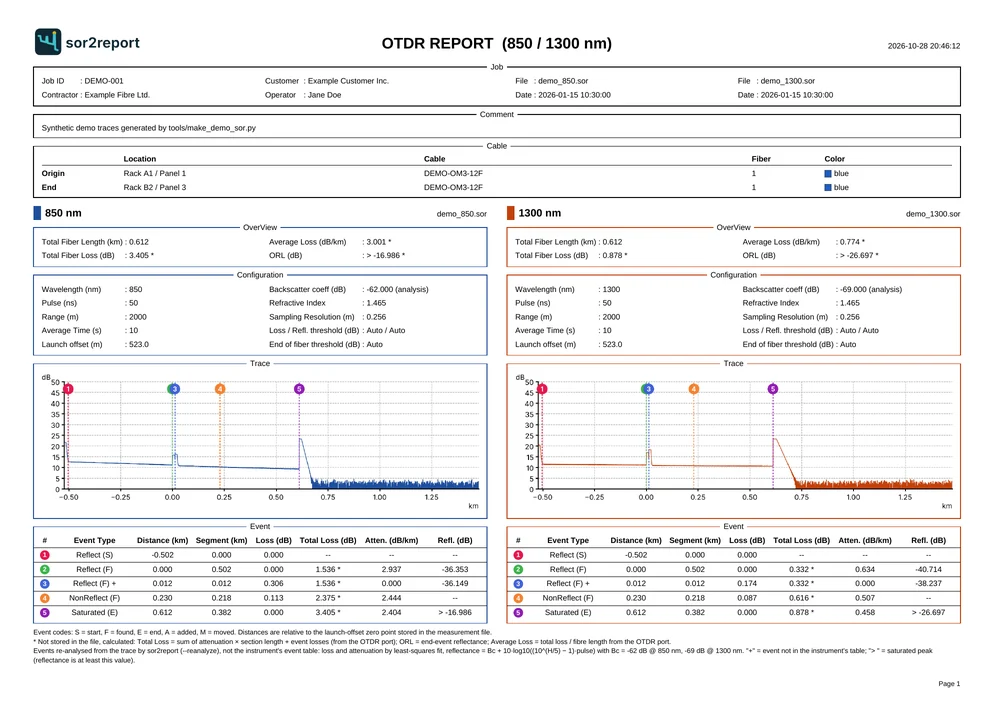
A whole cable in one command
Describe the job once in a CSV file: one row per fibre with the cable origin, end and the measurement files. sor2report writes every page into one PDF or one PDF per fibre.
Two wavelengths, one page
850 and 1300 nm, or 1310 and 1550 nm, side by side on landscape A4, in fixed colours. A single measurement gets a portrait page.
Launch cable taken care of
Distances start at the launch-cable zero point stored in the file, the same way your OTDR software shows them.
Finds the events your OTDR missed
Closely spaced connectors, connectors hidden behind a strong reflection:
--reanalyzesearches the trace again.Your name on it
Your logo in the corner of every page, your company, customer and operator in the header, Unicode text throughout.
From the field to a finished PDF
Copy the .sor files
Put the measurements from your OTDR into a
measurementsfolder. Any file name works; the CSV can refer to them by number.Describe the job
Write
jobs.csvin Excel or a text editor: job details on top, then one row per fibre. Comma or semicolon, UTF‑8 or Windows‑1250.Run sor2report
One command writes
reports/<Job ID>.pdf. Add--reanalyzeto re-detect events from the traces.
jobs.csv
Job ID,Contractor,Operator,Customer
JOB-001,Example Fibre Ltd.,Jane Doe,Example Customer Inc.
Origin-Location,Origin-Cable,Origin-Fiber,Origin-Color,
End-Location,End-Cable,End-Fiber,End-Color,File1,File2
Rack A1,OM3-12F,1,blue,Rack B2,OM3-12F,1,blue,0042,0045
Rack A1,OM3-12F,2,orange,Rack B2,OM3-12F,2,orange,0043,0044
Terminal
$ pip install .
$ sor2report jobs.csv --logo images/logo.png --reanalyze
  0042.sor: 3 events in file -> 4 after re-analysis (1 new)
  0045.sor: 2 events in file -> 4 after re-analysis (2 new)
  0043.sor: 4 events in file -> 4 after re-analysis
  0044.sor: 3 events in file -> 4 after re-analysis (1 new)
wrote reports/JOB-001.pdf (2 pages)
A second look at every trace
An OTDR saves its event table at the moment of the test, and it often misses things: the second of two connectors only a few metres apart, or a connector inside the dead zone of a strong reflection. With --reanalyze, sor2report ignores the stored table and searches the trace itself.
| Event | Distance |
|---|---|
| Start | −0.502 km |
| Connector | 0.000 km |
| Splice | 0.230 km |
| Fibre end | 0.612 km |
| Event | Distance |
|---|---|
| Start | −0.502 km |
| Connector | 0.000 km |
| Connector | 0.012 km |
| Splice | 0.230 km |
| Fibre end, saturated | 0.612 km |
Each reflection has to be about one pulse wide and stand out at least three times above the local noise, so the noisy far end of a multimode trace does not turn into a list of false events. Ghosts at twice the distance of a strong reflection are recognised and left out. Peaks that hit the receiver ceiling are marked as saturated, with the reflectance shown as a lower bound. On real multimode measurements, the results matched the events found by the OTDR vendor's own post-processing software, within half a metre.
- Input
- Telcordia SR‑4731 (Bellcore) .sor, versions 1.x and 2.x
- Output
- PDF, A4 portrait or landscape; one combined file or one per fibre
- Loss and attenuation
- Least-squares fits on the backscatter, with launch-cable compensation
- Reflectance
- R = Bc + 10·log10((10H/5 − 1) · pulse), with per-wavelength backscatter coefficients
- Runs on
- Windows, macOS and Linux with Python 3.9 or newer
- License
- MIT
Questions
What is a .sor file?
A .sor file (Standard OTDR Record) is the measurement file an OTDR saves after a test. The format is defined by Telcordia SR‑4731, originally by Bellcore. It holds the trace, the measurement settings, the event table and the cable and fibre identifiers.
Which OTDRs does sor2report support?
Any OTDR that saves standard SR‑4731 version 1 or version 2 .sor files. Most handheld OTDRs can export this format, either directly or from their PC software. If a file from your instrument does not work, open an issue on GitHub; please remove customer data from the file first.
Does sor2report change my measurement files?
No. sor2report only reads .sor files. Re-analysed events appear in the PDF report; the original files are left as they are.
Can I use sor2report commercially?
Yes. sor2report is released under the MIT license, so you can use it for paid installation work, change it and include it in your own tools.
Does it work for single-mode and multimode fibre?
Yes. The report shows whatever wavelengths were measured, for example 850 and 1300 nm on multimode or 1310 and 1550 nm on single-mode, two per page side by side.
What does event re-analysis do?
With --reanalyze, sor2report ignores the event table stored by the OTDR and searches the trace again. It finds reflections the instrument missed, such as two closely spaced connectors at the end of a launch cable, and ignores ghosts and noise. Events it adds are marked in the report.
Try it on the demo files
The repository includes three synthetic measurements and an example job file, so you can see a full report before using your own data.
$ git clone https://github.com/tgaboreu/sor2report.git
$ cd sor2report && pip install .
$ cd examples && sor2report jobs.csv --logo images/logo.png --reanalyze